












How to Use Hands-Free Smart Baby Swings


To use a hands-free smart baby swing, pick a stable spot near power and easy to watch. Secure your baby snugly with the harness, ensuring comfort and safety. Set up the swing by plugging it in, pairing it with the app or remote, and customize motion, speed, and sounds without interrupting your baby. Many models offer voice control for true hands-free use. Keeping it maintained prevents issues, and if questions arise, support is just a call away. Explore these tips to optimize your swing experience.
Table
- Main Points
- Choosing the Right Location for Your Smart Baby Swing
- Ensuring Safety With Proper Harness Use
- Setting Up Your Smart Baby Swing for First Use
- Using the Smart Remote Control Features
- Adjusting Swing Modes and Motion Settings
- Selecting and Playing Soothing Sounds and Lullabies
- Utilizing the Timer Function for Swing Duration
- Reclining Positions for Optimal Baby Comfort
- Connecting Your Swing to Mobile Apps for Enhanced Control
- Voice Control Integration With Smart Home Devices
- Cleaning and Maintenance Tips for Longevity
- Troubleshooting Common Swing Issues
- Contacting Customer Support for Assistance
- Frequently Asked Questions
- Final Thoughts
Main Points
- Pair the smart baby swing with your mobile app or voice assistant for hands-free control of motion and sound settings.
- Use voice commands through integrated smart home devices to adjust swing speed, sound volume, and timer without manual interaction.
- Set automatic timers for swing operation to enable hands-free start and stop based on your baby’s soothing needs.
- Monitor and control swing status remotely via the companion app to adjust settings without physically touching the swing.
- Ensure the swing is securely harnessed and positioned safely before activating hands-free features for optimal baby comfort and safety.
Choosing the Right Location for Your Smart Baby Swing
When choosing the right location for your smart baby swing, make sure the surface is flat and stable to keep your baby safe and prevent tipping.
You’ll want to position the swing near a power outlet since most models need to be plugged in for smooth operation.
Pick a well-lit area so you can easily keep an eye on your little one while they enjoy the soothing swing. Consider that Bluetooth control allows you to customize the swing’s settings from your smartphone, making it more convenient to adjust without moving the swing itself.
Choose a bright spot to comfortably watch your baby relax in their soothing swing.
Avoid high-traffic spots or places near stairs to reduce distractions and risks, creating a calm environment your baby loves.
Minimizing noise and disturbances around the swing helps enhance its soothing capabilities, making it easier for your baby to relax.
Thoughtful placement shows your care and supports your baby’s comfort and safety.
Ensuring Safety With Proper Harness Use

Make sure you adjust the 5-point harness snugly, allowing just enough room to fit two fingers between it and your baby’s body for both comfort and security.
Regularly inspect the harness for any wear or damage to keep your little one safe while swinging.
Understanding how to properly secure and check the harness on your specific swing model is key to preventing accidents.
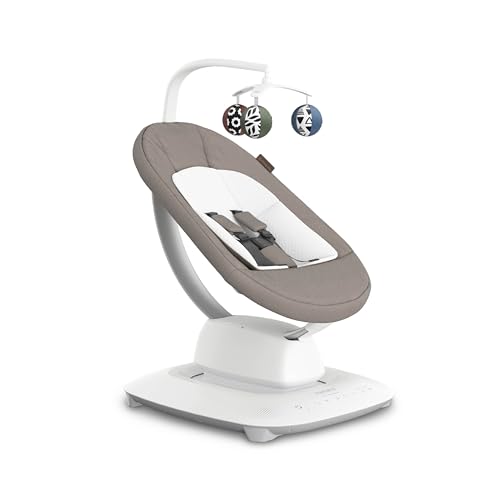
The MamaRoo's convertible harness system offers both 3-point and 5-point options, ensuring a secure fit as your baby grows and moves through different developmental stages.
Secure Harness Adjustment
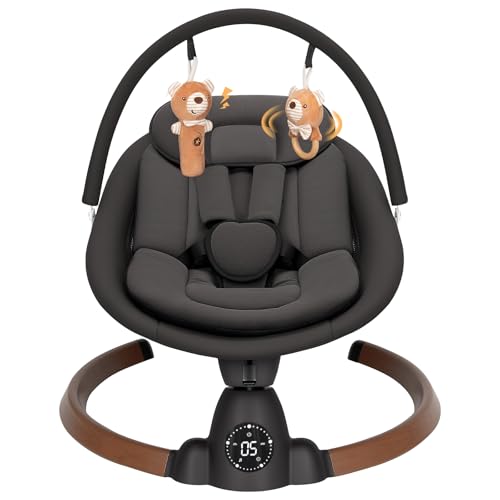
A properly adjusted 5-point safety harness is essential to keep your baby secure and comfortable in the swing. To guarantee safety, make sure both the shoulder straps and buckle are fastened firmly, preventing your baby from slipping out. The harness should be snug but not too tight, allowing gentle movement without compromising security. Many swings feature easy-to-use adjustment systems, so take advantage of these as your baby grows. For added peace of mind, consider models that incorporate intuitive LCD touchscreens to make monitoring and adjusting settings straightforward for caregivers. Always follow the manufacturer’s weight guidelines, typically between 25 to 44 pounds, to maintain proper support. Regularly inspect the harness for signs of wear or damage, replacing it if needed. By attentively adjusting the 5-point safety harness, you provide a safe, cozy environment that supports your baby’s well-being while using the swing.
Harness Safety Checks
Ensuring your baby’s 5-point harness is properly secured every time you use the swing is essential for their safety and comfort.
A securely fastened harness prevents slips and keeps your little one safely in place as the swing soothes them. The Angelbliss Baby Swing prioritizes safety with a harness system designed to ensure your baby stays secure during motion.
Before each use, make these quick checks:
- Verify the harness straps fit snugly without restricting movement, providing secure yet comfortable restraint.
- Inspect the harness for any signs of wear or damage that could compromise safety.
- Adjust the harness according to your baby’s growth following the manufacturer’s guidelines to maintain effectiveness.
Setting Up Your Smart Baby Swing for First Use

To get your smart baby swing ready for first use, start by carefully assembling all parts according to the instruction manual, making sure each connection is secure and the swing stands stable. Next, plug it into a power source and check that the power indicator lights up, confirming it’s ready. Download the companion app from Google Play or the Apple App Store to access remote control and extra features. Follow the in-app steps to pair your device via Bluetooth; the swing’s indicator will glow blue when connected. Finally, customize settings like motion speed and white noise through the app or touchscreen to create a soothing environment tailored to your baby’s needs. Proper setup guarantees safe, hands-free comfort for your little one.
Using the Smart Remote Control Features

First, make sure you pair the remote with your smart swing via Bluetooth to enable smooth control.
Once connected, you can easily adjust settings like speed, motion, and sound without disturbing your baby.
This remote setup lets you customize the swing’s features quickly and conveniently from across the room.
For added convenience, the remote allows you to control sound quality and volume so you can create the most calming environment for your baby without ever having to leave your seat.
Remote Setup Process
Although setting up your smart baby swing might seem complex at first, the remote control features make it straightforward and convenient. Start by assembling the swing, plugging it in, and powering it on to activate the smart remote. This setup lets you easily soothe your baby with customized settings designed for comfort and care. For added convenience, many models are lightweight and compact, making it simple to move your swing between rooms or take it on trips.
To get started quickly, focus on these key setup steps:
- Pair the remote with the swing via Bluetooth for full control.
- Select your baby’s preferred swinging mode—swing, line, or loop.
- Set the timer for automatic shut-off in 15, 30, or 45 minutes.
Adjusting Swing Settings
Once you’ve paired the remote with your smart baby swing and selected the initial settings, you can easily fine-tune the experience to suit your baby’s needs.
Use the remote to adjust the swing’s speed and choose from multiple motion types—such as swing, line, or loop—to provide varied soothing rhythms. Many electric baby swings include built-in lullabies that can be selected from the remote, allowing you to create a calming environment without manually switching songs.
Many remotes also offer adjustable recline positions, supporting your baby’s head and neck for added comfort.
You can set a timer for 15, 30, or 45 minutes to guarantee the swing soothes your baby without needing manual intervention.
Some smart swings connect via Bluetooth, letting you control all these adjustable settings from your smartphone or tablet.
This hands-free control helps you focus on caring for your little one while guaranteeing they stay calm and comfortable.
Adjusting Swing Modes and Motion Settings

When you adjust the swing modes and motion settings, you can tailor the soothing experience to your baby's unique preferences. Most hands-free smart swings offer multiple motion options—like swing, line, and loop—so you can find what best calms your little one. You’ll typically control these settings through a smartphone app, touchscreen, or remote, allowing you to make changes without disturbing your baby. Many models also feature Bluetooth connectivity for streaming music or adjusting settings, adding another layer of convenience for parents. Remember to check the manufacturer’s guidelines for age and weight limits to keep your baby safe.
Customize motion modes and speeds via app or remote for a soothing, hands-free baby swing experience.
Key points to reflect on:
- Choose the motion setting that most effectively soothes your baby’s mood
- Adjust swing speeds to match your infant’s comfort level
- Use remote or app controls for hands-free convenience
This personalized approach helps create a nurturing environment your baby will love.
Selecting and Playing Soothing Sounds and Lullabies
You can choose from a variety of soothing sounds and lullabies right on your smart swing’s app or touchscreen to create the perfect calming environment.
Many models let you control playback duration and volume, so you can tailor the experience without disturbing your baby.
Taking advantage of these options helps you soothe your little one with ease and flexibility.
Sound Selection Options
Choosing the right sound can make a big difference in soothing your baby. Smart baby swings offer various sound selection options, allowing you to create a calming environment tailored to your little one’s needs.
You can easily select from built-in lullabies, nature sounds, or even stream your baby’s favorite tunes via Bluetooth. Many models, like the MamaRoo, feature touchscreen controls or apps such as Nuby to adjust volume and choose from up to 10 soothing sounds.
You can also set timers to play sounds for specific durations, ensuring consistency.
Consider these sound options to soothe your baby effectively:
- Preloaded lullabies and nature sounds
- Bluetooth streaming for personalized soundtracks
- Programmable timers for scheduled sound play
These features help you serve your baby’s comfort with ease and precision.
Lullaby Playback Control
Although selecting the perfect lullaby might seem simple, controlling playback on your smart baby swing guarantees a tailored soothing experience that meets your baby's unique needs.
Use the Bluetooth® feature to connect your smartphone and access a variety of lullabies and soothing sounds, including nature sounds and white noise. You can easily adjust volume and sound settings via the touchscreen or app, ensuring comfort for your little one.
Setting timers for 15, 30, or 45 minutes lets you control how long the soothing sounds play, helping your baby drift off peacefully.
Don’t forget to check for software updates regularly; new sounds and features keep your lullaby options fresh and effective.
With these controls, your swing becomes a personalized haven of calm.
Utilizing the Timer Function for Swing Duration
When managing your baby's soothing sessions, utilizing the timer function on your smart baby swing offers a practical way to control the duration of gentle motion.
The timer settings let you choose from preset intervals like 15, 30, or 45 minutes, allowing you to customize how long the baby swing operates to soothe your little one effectively.
This feature prevents overuse and helps maintain a calming environment without overstimulation. Many smart swings also include automatic shutoff for added safety and energy efficiency, so you can focus on other tasks without worry.
Activating the timer is simple—just select your preferred time on the digital display or remote control.
Once time’s up, the swing automatically stops, giving you peace of mind.
Key benefits include:
- Flexible timer settings tailored to your baby’s needs
- Prevents excessive swinging and overstimulation
- Automatic shutoff for safety and convenience
Reclining Positions for Optimal Baby Comfort
Since your baby’s comfort and safety are paramount, adjusting the reclining positions on your smart baby swing can make a significant difference.
Many swings offer multiple recline positions—such as 35°, 65°, and 95°—allowing you to find the perfect angle to support your baby’s head and neck, especially important for newborns up to 20 lbs.
By customizing these settings, you not only enhance comfort but also help soothe your little one more effectively. Just as with adjustable mattress heights found in quality cribs, the ability to fine-tune the recline ensures lasting adaptability as your baby grows.
Some models provide three chair settings that adapt as your baby grows, ensuring ongoing support and security.
Proper use of recline positions prevents discomfort and promotes a calming environment, letting your baby feel safe and relaxed while benefiting from the swing’s gentle motion.
Connecting Your Swing to Mobile Apps for Enhanced Control
To get the most out of your smart baby swing, you’ll want to connect it to the dedicated mobile app designed for seamless control.
Start by downloading the app from Google Play or the Apple App Store. Power on your swing and enable Bluetooth on your device. Then, add your swing under “My Products” by tapping the “+” icon. This connection lets you customize settings to soothe your baby perfectly.
With the app, you can:
- Adjust swing motion, speed, and sound for tailored comfort
- Monitor swing performance and receive updates
- Easily control your baby’s soothing experience from anywhere
Connecting your swing to the app empowers you to create the ideal environment to calm and comfort your little one effortlessly.
Voice Control Integration With Smart Home Devices
Beyond app control, many smart baby swings also offer voice control integration with popular smart home devices like Amazon Alexa and Google Home.
You can link your swing to a 2.4 GHz Wi-Fi network through its mobile app, such as the 4moms App, to enable this hands-free feature.
Once connected, you’ll use simple voice commands to adjust the swing’s motion, speed, and sounds without interrupting your caregiving tasks.
This seamless voice control lets you soothe your baby while multitasking, making it easier to respond quickly to their needs.
By integrating voice control with your smart home setup, you create a more efficient, nurturing environment that supports both you and your baby with minimal effort.
Cleaning and Maintenance Tips for Longevity
Although smart baby swings come with advanced features, keeping them clean and well-maintained is essential to guarantee safety and extend their lifespan.
Regular maintenance not only guarantees your baby’s comfort but also keeps the swing functioning smoothly.
To help you care for your swing effectively, focus on these key points:
- Machine wash the removable seat cover on a gentle, cold cycle and tumble dry on low heat for hygiene.
- Wipe the frame and base with a dry cloth to remove dust, preventing obstruction in mechanical parts.
- Inspect and clean the 5-point harness regularly, avoiding bleach to maintain fabric strength.
Troubleshooting Common Swing Issues
Keeping your smart baby swing clean and well-maintained sets the stage for smooth operation, but sometimes issues can still arise. If the swing isn’t working, first check it’s properly plugged in and the power indicator is on. For any strange noises, inspect for loose parts or metal rubbing and tighten or lubricate them to keep the swing quiet and soothing for your baby. If you experience Bluetooth connection problems, verify your app is updated and stay within range for reliable control. Adjust the swing’s speed and sound settings to enhance your baby’s comfort and soothe them effectively. If problems persist, consult the instruction manual for specific tips to troubleshoot common concerns, helping you keep your baby calm and content.
Contacting Customer Support for Assistance
If you run into problems with your smart baby swing that you can't resolve on your own, contacting customer support is a reliable next step. They’re equipped to help soothe your concerns and troubleshoot effectively, ensuring your baby’s comfort isn’t interrupted.
Reach out via phone or email during operating hours: Monday to Friday, 8:00 am to 5:00 pm Central Time. Before calling, have your model number and purchase receipt handy to speed up the process.
Keep in mind:
- Customer support teams guide you through setup and app-related issues.
- Manufacturer websites often provide manuals and troubleshooting tips for quick help.
- Clear communication with support helps resolve problems swiftly, so your swing keeps soothing your baby as intended.
Frequently Asked Questions
Do Pediatricians Recommend Baby Swings?
Pediatricians recommend baby swings with swing safety tips in mind. You should follow pediatric advice, monitor baby sleep patterns closely, and use swings in moderation to soothe your infant safely and support their healthy development.
When to Stop Using 4moms Swing?
You should stop using the 4moms swing around 9 months or 25 pounds, following age recommendations. Limit swing duration to guarantee baby comfort, especially as they start sitting up or moving independently for safety and well-being.
How Do I Connect My Phone to My Munchkin Swing?
To connect your phone, power on the swing and enable Bluetooth. Download the Munchkin app, follow pairing prompts, and explore swing app features. For Bluetooth connection tips or troubleshooting swing issues, stay close and retry if needed.
How Do You Work Ingenuity Baby Swing?
You’ll operate the ingenuity baby swing by plugging it in, selecting swing modes on the digital display, and using the remote. Follow safety guidelines like securing the 5-point harness and maintain it by washing the breathable seat pad regularly.
Final Thoughts
Using your hands-free smart baby swing might seem overwhelming at first, but once you get the hang of it, it’s a game-changer for both you and your baby. Don’t worry if the technology feels tricky; the step-by-step setup and voice control make it simple and convenient. With proper safety checks and regular maintenance, you’ll enjoy stress-free soothing anytime. Give it a try—you’ll wonder how you ever managed without it!
If you want to know other articles similar to How to Use Hands-Free Smart Baby Swings you can visit the Smart Baby Swings & Bouncers category.
Best Smart Baby Swings of 2024 Reviewed

Best Smart Baby Swings for Twins: Top 7 Picks

Why Are Quiet Motor Smart Baby Bouncers Best?

How to Use a Smart Baby Bouncer With Music

Why Are These Smart Swings Safest for Infants?

How to Use Portable Smart Baby Bouncers for Travel

Top 10 Tips for Automatic Rocking Baby Swings

10 Best Baby Swings With Built-In Nightlights

3 Best Smart Baby Swings for Newborns
This is also interesting