















TP-Link Tapo C100 Camera Review


With the TP-Link Tapo C100, you get a compact, budget-friendly indoor camera offering clear 1080p video and dependable night vision up to 30 feet. Its motion detection is reliable, though sensitive settings may cause occasional false alerts. You’ll appreciate easy setup and compatibility with Amazon Alexa and Google Assistant for voice control. While advanced motion features require a subscription, the core functions cover essential security needs effectively. Keep exploring to discover more about its features and performance.
Table
Main Points
- TP-Link Tapo C100 offers reliable motion detection with accurate alerts and a user-friendly interface for easy sensitivity adjustments.
- It features advanced night vision with infrared LEDs, providing clear images up to 30 feet in near-total darkness.
- The camera delivers optimized image quality with consistent clarity in various lighting conditions, especially low-light environments.
- Compatible with Amazon Alexa and Google Assistant, enabling seamless voice control within smart home ecosystems.
- Affordable and compact, the Tapo C100 is ideal for home or business use, balancing performance and budget effectively.
Motion Detection Strengths and Weaknesses
You’ll appreciate the Tapo C100’s motion detection for its accuracy and timely alerts, which help you monitor activity effectively. However, some users find the sensitivity settings occasionally trigger false alarms or miss subtle movements. For those seeking more comprehensive monitoring, options with multi-camera support may provide better coverage and flexibility for evolving security needs. Let’s examine these strengths and areas where the system could improve to better suit your security needs.
What We Liked
Although motion detection technology can sometimes generate false alerts, the TP-Link Tapo C100 excels in delivering accurate and timely notifications that help you stay informed about activity in your monitored space.
You’ll appreciate its user friendly interface, which simplifies customizing motion sensitivity and notification settings. This budget friendly option balances performance and affordability, making it accessible for various households.
Its clear video quality and dependable alerts support your efforts to protect loved ones or property efficiently. The camera’s integration with voice assistants further enhances convenience, empowering you to respond promptly while managing other responsibilities.
What Can Be Improved
While the TP-Link Tapo C100 offers reliable motion detection, its sensitivity settings sometimes trigger false alerts that can interrupt your experience.
You might find the user interface intuitive but limited in customization, making it harder to fine-tune motion zones precisely. This can be frustrating when you want to minimize unnecessary notifications.
Additionally, accessing advanced motion tracking features requires a cloud subscription, which adds ongoing costs.
Improving the ability to adjust sensitivity within the app without extra fees would better serve users seeking consistent, accurate alerts. These enhancements would strengthen the camera’s practical value for monitoring loved ones.
Affordable 1080P Indoor Security Camera
An affordable 1080P indoor security camera like the TP-Link Tapo C100 offers high-definition video quality without stretching your budget.
You get clear, detailed footage essential for monitoring loved ones or property, all at an accessible price point. Its affordable pricing makes it a practical choice for anyone seeking budget security without sacrificing core features like motion detection and night vision.
This camera balances cost and performance effectively, enabling you to serve your home or community’s safety needs reliably.
You’ll appreciate how this device meets essential security demands while respecting financial constraints.
Box Contents and Accessories
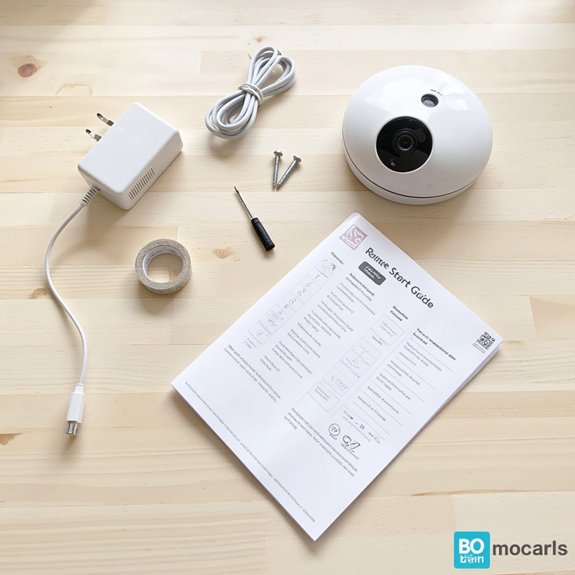
When you unbox the TP-Link Tapo C100, you'll notice its compact size at 2.66 x 2.15 x 3.89 inches and weight of just 8.8 ounces, making it easy to position anywhere.
The package includes a detailed quick start guide that helps you set up the camera swiftly and correctly.
These accessories guarantee you have everything necessary for immediate installation and use.
Dimensions and Weight Details
You’ll find the TP-Link Tapo C100 camera measures a compact 2.66 x 2.15 x 3.89 inches and weighs just 8.8 ounces, making it easy to position discreetly in various indoor settings.
Understanding the camera dimensions and weight specifications helps you optimize placement for effective monitoring. Key details include:
- Lightweight design guarantees simple mounting without extra support.
- Small footprint fits well on shelves, desks, or walls.
- Balanced weight aids in stable attachment and reduces the risk of falls.
These precise dimensions and weight specifications support your goal of unobtrusive, reliable surveillance in homes or offices.
Quick Start Guide Included
The TP-Link Tapo C100 package includes essential components designed to facilitate a smooth setup and immediate use.
Inside, you’ll find the camera, DC power adapter, mounting screws with a template, and a quick start guide.
This user manual is concise yet thorough, guiding you through the quick setup process step-by-step, including connecting to Tapo Wi-Fi before linking to your home network.
The clear instructions reduce confusion, enabling you to focus on serving your family or clients effectively.
Having these accessories and documentation guarantees you can deploy the camera promptly and confidently without delays.
Voice Assistant Compatibility
You’ll find the Tapo C100 supports Amazon Alexa and Google Assistant, letting you control the camera with simple voice commands.
Setting up integration involves linking the camera through the respective app, enabling you to stream live footage on devices like Echo Show or Chromecast.
Understanding these features and setup nuances helps you maximize hands-free monitoring and streamline your smart home experience.
Supported Voice Platforms
Although setting up smart home devices can sometimes be complex, TP-Link Tapo C100 simplifies integration by supporting popular voice platforms such as Amazon Alexa and Google Assistant.
These voice platform options guarantee you can effortlessly connect the camera to your existing smart ecosystem, enhancing the user experience. By enabling voice control through widely used assistants, you gain convenient access to live streams and status updates, which is especially helpful when caring for others.
This compatibility promotes seamless interaction without demanding technical expertise, allowing you to focus on serving your household’s needs efficiently and effectively.
Voice Command Features
When integrating TP-Link Tapo C100 with voice assistants like Amazon Alexa and Google Assistant, you gain hands-free control over key camera functions.
This voice control capability streamlines monitoring tasks within your smart home environment, allowing you to activate live streams or adjust settings through simple commands.
The camera’s compatibility guarantees seamless interaction with devices like Echo Show and Google Chromecast, enhancing accessibility for caregivers and homeowners alike.
Integration Setup Tips
Setting up the TP-Link Tapo C100 for voice assistant compatibility requires careful attention to network configurations and device synchronization to secure seamless integration.
To guarantee reliable performance, follow setup best practices such as confirming your Wi-Fi operates on a 2.4GHz band and that the Tapo app is updated.
When linking the camera to Alexa or Google Assistant, authenticate accounts fully and verify device discovery.
If issues arise, use integration troubleshooting tips like restarting your router, re-syncing the camera, or resetting permissions in the voice assistant app.
These steps help you provide consistent support and functionality to those relying on the system.
Streaming via Assistants
How effectively does the TP-Link Tapo C100 integrate with popular voice assistants for streaming video?
When you use Amazon Alexa or Google Assistant, the camera’s streaming quality remains clear and consistent on devices like Echo Show and Chromecast. Assistant responsiveness is swift, allowing you to access live footage hands-free, which is especially helpful when monitoring children or pets.
This seamless integration guarantees you can serve your household with real-time visibility without fumbling through apps. However, occasional delays may occur depending on Wi-Fi strength.
Reliable Night Vision Performance

Several factors contribute to the TP-Link Tapo C100’s reliable night vision performance, making it a dependable choice for monitoring in low-light conditions.
You’ll benefit from advanced night vision technology that uses infrared LEDs to illuminate up to 30 feet without disturbing your environment. This guarantees clear, detailed images even in near-total darkness.
The camera’s low light performance excels due to its sensor sensitivity and optimized image processing, providing consistent clarity.
Exceptional low-light clarity thanks to enhanced sensor sensitivity and refined image processing technology
For those committed to serving loved ones or clients, this dependable night vision feature assures continuous surveillance, enhancing safety and peace of mind during nighttime hours.
Frequently Asked Questions
Can the Tapo C100 Camera Be Used Outdoors With Weatherproofing?
With a 4.4-star rating from over 17,000 users, you shouldn’t use this indoor security camera outdoors despite its IP65 rating. Proper camera placement indoors guarantees peak performance without risking weather damage or compromised monitoring quality.
How Does the Tapo C100 Handle Multiple Simultaneous Users?
You can assign user permissions to control access, enhancing the user experience by allowing multiple users to view the live stream simultaneously. This guarantees secure, efficient monitoring while serving family or team members effectively.
What Is the Warranty Period for the Tapo C100 Camera?
You’ll find warranty details typically offer a one-year limited warranty, covering defects. If issues arise, customer support stands ready to assist, ensuring your device’s reliability and your peace of mind throughout the coverage period.
Is There a Battery Backup Option for Power Outages?
Imagine a sudden blackout while monitoring loved ones; you’ll find the camera lacks built-in battery backup, so you’ll need external power solutions to maintain battery life and guarantee uninterrupted surveillance during outages.
Can the Camera's Firmware Be Updated Automatically?
You can enable automatic firmware updates to maintain your camera’s functionality and security. This guarantees your device stays current with improvements, helping you provide reliable monitoring without manually checking for updates.
If you want to know other articles similar to TP-Link Tapo C100 Camera Review you can visit the Baby Monitors category.
Why Choose Baby Monitors With Motion Detection?
What Are the Best Video Baby Monitors for Large Homes?

What Are the Best Non WiFi Baby Monitors?

7 Tips for Baby Monitors With Thick Walls

Best Baby Monitors With Two-Way Audio Features

5 Best Portable Baby Monitors for Travel

5 Tips for Choosing Baby Monitors for Twins

Best Baby Monitors for Multiple Rooms

10 Tips for Baby Monitors With Temperature Sensors
This is also interesting